

For both end-users and IPTV resellers, mastering the Xtream Codes API login method is crucial. It provides a significantly more stable, feature-rich, and organized streaming experience compared to using basic M3U links.
The Xtream Codes API represents the professional, streamlined standard for securely connecting your chosen IPTV client application (such as IPTV Smarters Pro) to our high-performance streaming server.
For the User (End-Client): The Xtream Codes API is the full set of personalized credentials provided by your service provider. It consists of three distinct, required components for a successful login:
Server URL: The secure network address of the streaming server.
Username: Your unique subscriber identifier.
Password: Your private, secure access key.
For the Provider (Seller): When generating a new subscription, the provider extracts the full M3U Playlist link from the IPTV Panel (or equivalent middleware system) and cleanly separates it into these three components (URL, Username, and Password). This organized data set is the Xtream Codes API that is shared with the client for robust app setup.
The Xtream Codes API is the preferred method for superior service because it enables advanced features crucial for a modern viewing experience:
Automatic EPG (Electronic Program Guide) updates.
Seamless VOD (Video on Demand) organization.
Reliable Catch-Up TV and recording functionality. These features are often unreliable or unsupported when using simple M3U playlist files.
To view our IPTV service on any display (including Smart TVs, Firesticks, and Android Boxes), you must install an IPTV player that is specifically compatible with the Xtream Codes API login method.
The correct application depends on your device. We recommend several top-tier apps that fully support the Xtream Codes login method:
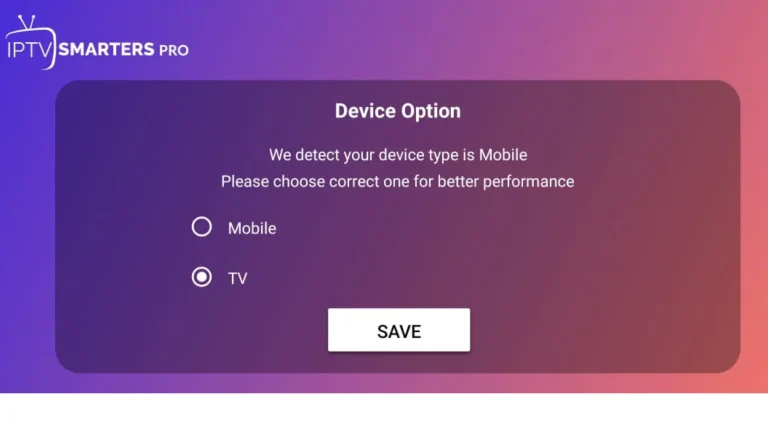
Upon launching your chosen IPTV player application, you will be presented with several options for importing your channel list. While many applications offer multiple paths, they are all designed to guide you to the same optimal choice.
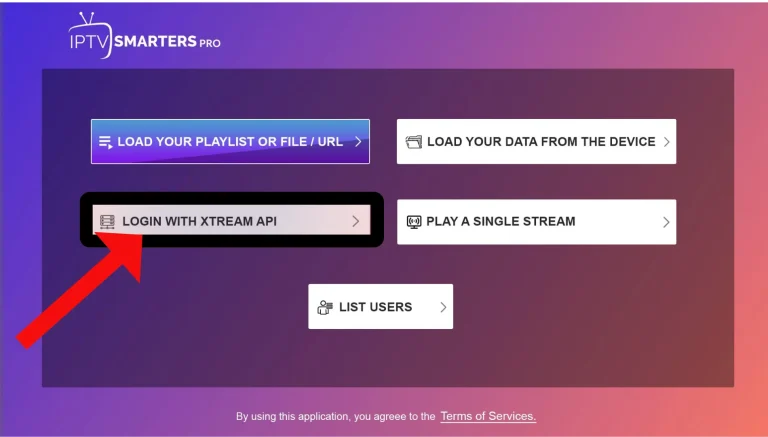
Typically, you will see four options, including various ways to load an M3U file.
For a high-quality, fully featured experience, you must ignore the M3U options and select the one that reads: “Login with Xtream Codes API.”
This is usually presented as the third option and is the only method that guarantees reliable Electronic Program Guide (EPG) data, seamless VOD library access, and superior stream stability for our premium service.
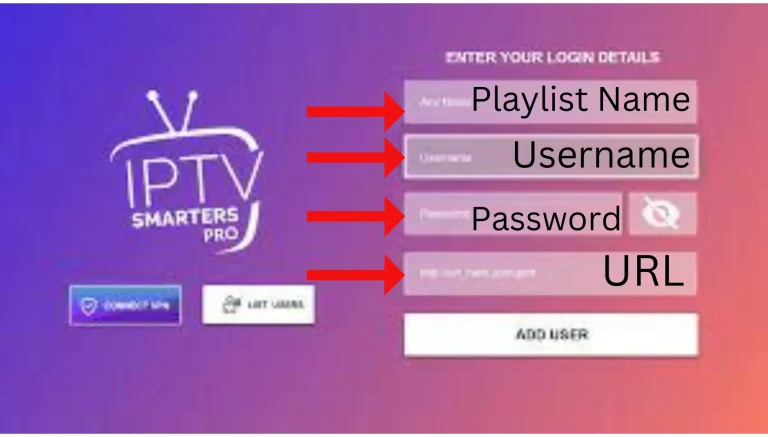
Once you have selected the “Login with Xtream Codes API” option, a structured login interface will appear on your screen. This interface is designed for maximum security and stability, requiring the three unique credentials you received upon subscribing.
The interface will present three distinct fields for input:
Any Name: Enter a descriptive name for your profile (e.g., “Home IPTV,” “My Dubai Subscription”). This is for your reference only and does not affect the connection.
Username: Carefully enter the unique Username provided by your service provider. This is case-sensitive.
Password: Carefully enter the secure Password provided by your service provider. This is also case-sensitive.
Server URL/Portal URL: Enter the complete server address (e.g., http://yourserver.com:8080).
Action Item: All three required credentials (Username, Password, and Server URL) are provided to you by your service provider (us). These credentials are unique to your subscription and are essential for accessing the protected content channels.
Need Credentials? If you are a new user and have not yet received your login details, please ensure your order is confirmed and check your email inbox (including the spam folder). If you are unable to locate the details, please contact our 24/7 support team immediately for assistance.
After accurately entering all three items, click the “Add User” or “Sign In” button to establish a secure connection to our streaming servers.
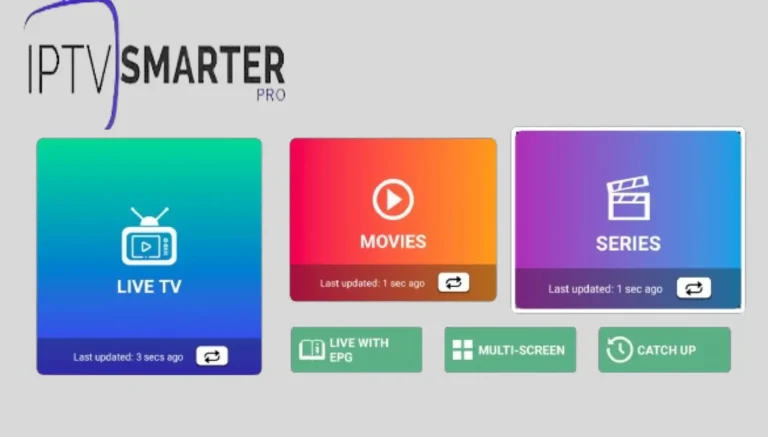
Congratulations! Once the Xtream Codes API connection is successfully established, the application will automatically synchronize with our server. You have now gained instant access to the full scope of your premium IPTV subscription.
Live Channels: All international and local channel categories will populate instantly. You can now browse and watch channels relevant to your country (e.g., UAE, Ireland, UK) or explore our vast global selection.
On-Demand Content: Beyond live television, your subscription gives you full access to our massive, organized library of Movies (VOD) and TV Series.
Customization: You have the flexibility to manage your viewing experience by marking channels as favorites or creating custom channel lists within the app.
We pride ourselves on offering unmatched customer service. If you encounter any issues—whether it’s an application error, a connection problem, or if you require assistance with adding extra content (e.g., specific channels or a larger VOD package)—our expert support team is ready to help.
Action: If you experience any technical difficulties, or if you wish to inquire about expanding your channel or movie access, please contact our service provider support team immediately.
Resolution: We will promptly resolve your issue, ensure your application is running optimally, and can assist with advanced requests like adding custom playlists or troubleshooting device-specific problems.
The Xtream Codes API is the modern, professional connection standard. Unlike a simple M3U link, the API enables full functionality, including reliable Electronic Program Guide (EPG) updates, full access to our organized VOD (Video on Demand) library, and superior stream stability.
Always choose “Login with Xtream Codes API.” The M3U method is outdated, often fails to load EPG data, and can lead to buffering issues. The API method is required for the best service experience.
our three unique credentials (Server URL, Username, and Password) are automatically generated and sent to your email address immediately after your order is confirmed. Please check your spam or junk folder if you do not see them in your primary inbox.
For standard HD content, a minimum stable speed of 10 Mbps is required. For buffer-free 4K Ultra HD content, we recommend a connection of 30 Mbps or higher. We always recommend a wired Ethernet connection for optimal performance.
This usually indicates a problem with the Internet connection. Ensure your Ethernet cable is firmly connected to both the MAG Box and your router, or confirm your Wi-Fi settings are correct before restarting the device.
Our standard subscription supports one concurrent connection. If you wish to use the service on multiple devices simultaneously (e.g., watching on two TVs at the same time), you will need to purchase our Multi-Device subscription plan.
Yes. Our service fully supports all major streaming devices that can run a compatible player app. This includes the Amazon FireStick, MAG Box, Android Boxes, Android Smart TVs, and more. Our setup guide page contains specific instructions for the most popular devices.
First, check your internet speed. If your speed is sufficient, try restarting your device and your router/modem. If the issue persists, contact our 24/7 technical support team via Live Chat or email.
Simply contact our support team. For security purposes, we can verify your account using your original payment information or email address and resend your complete Xtream Codes API credentials immediately.